Key takeaways
- This guide to Mitsubishi air conditioning symbols, part of our air conditioning repair guide, covers the wireless remote of the Mitsubishi Electric MSZ-LN wall unit, from the maker’s operating instructions. The manuals draw the icons as pictures, so we name each function by the word the manual prints; match it to the icon on your own remote.
- Modes cycle AUTO, COOL, DRY, HEAT, FAN. In DRY you cannot set a temperature. After COOL or DRY, Mitsubishi recommends running FAN to dry inside the indoor unit.
- POWERFUL cancels after 15 minutes. NIGHT MODE dims the operation lamp, turns off the beep and limits the outdoor unit’s noise. i-see senses where people are in the room.
- A blinking operation indicator lamp is a “stop using the air conditioner and consult your dealer” case in Mitsubishi’s manual.
- The label on your unit decides which manual applies. Other Mitsubishi ranges have different remotes.
Which Mitsubishi remote is this page about?
It is about the remote of the MSZ-LN wall unit, and the buttons, modes and lamps below come from two Mitsubishi documents:
- Operating instructions VG79Y699H01 (English, hosted by Mitsubishi Electric New Zealand). It names MSZ-LN25VG2, MSZ-LN35VG2, MSZ-LN50VG3 and MSZ-LN60VG3. This is the New Zealand edition, and it is the full version.
- MSZ-LN18-60VG2 Instruction Book DG79A05RL01 from Mitsubishi Electric UK’s document library. It names the VG2 models 18 to 60, is in English first with 15 other languages, and says it is a brief version with the full operating instructions on a Mitsubishi website. We used it to check the buttons, cleaning rules and stop-and-call list against the UK edition.
The current UK 2.5 kW model is the MSZ-LN25VG3, which neither document names. We found no UK operating instructions for the VG3, so check your remote against your own unit’s manual. This page does not cover other Mitsubishi ranges, which have different remotes. The brand’s range is on Mitsubishi Electric air conditioners and Mitsubishi air conditioners. This page sits within our guide to air conditioning repair; for brand-neutral symbols see air conditioning symbols explained.
Stop and consult your dealer. Both Mitsubishi documents say: “In the following cases, stop using the air conditioner and consult your dealer”: “When water leaks or drips from the indoor unit”, “When the operation indicator lamp blinks”, “When the breaker trips frequently”, “When an abnormal sound is heard” and “When any refrigerant leakage is found.” The manual also says the unit “should not be installed, relocated, disassembled, altered, or repaired by the user.”
The buttons, named
Function names are as the manual prints them. Limits are Mitsubishi’s, from the New Zealand edition unless noted.
| Button | What it does in Mitsubishi’s words | Limit |
|---|---|---|
| OFF/ON | Stops and starts operation | |
| Operation select | Each press changes the mode | Order below |
| Temperature buttons | Each press raises or lowers the temperature by 1C | Temperature cannot be set in DRY or during POWERFUL |
| FAN | Changes fan speed | AUTO, Quiet, Low, Medium, High, Super High (the UK brief book prints “Silent”) |
| VANE and WIDE VANE | Set the up-down and left-right airflow direction | Always use the remote; moving the vanes by hand “causes them to malfunction” |
| ECONO COOL | Swing airflow “makes you feel cooler than stationary airflow”; the set temperature and direction change automatically | Cooling mode only; cancelled by VANE or POWERFUL |
| POWERFUL | Uses an exclusive fan speed in COOL or HEAT | Cancels after 15 minutes, or when OFF/ON, FAN, ECONO COOL or i-save is pressed |
| i-save | Recalls a saved setting with one press; two settings can be stored (one for COOL or ECONO COOL, one for HEAT) | Cancelled when MODE or POWERFUL is pressed |
| NIGHT MODE | Dims the operation lamp, disables the beep and limits outdoor unit noise | Using POWERFUL during NIGHT MODE raises outdoor noise |
| PURIFIER | Starts air purifying, which the manual says reduces airborne fungi, viruses, mould and allergens | Never touch the device in operation |
| i-see sensor button | Switches the i-see control; default is active | See below |
| DIRECTION | Airflow control: INDIRECT, DIRECT, EVEN, OFF | Works only while i-see is effective |
| TIME and TIMER | Set the ON and OFF timers (10 minutes per press) | Set the current time first |
| CLOCK, RESET | Set the clock; reset after changing batteries |
The modes
Each press of the operation select button changes the mode in this order: AUTO, COOL, DRY, HEAT, FAN. Mitsubishi describes them as follows:
- AUTO. The unit chooses according to the difference between room and set temperature, changing between cool and heat when the room is about 2C from the set temperature for more than 15 minutes.
- COOL. Cooling at your set temperature. The manual says not to run COOL at very low outside temperatures (less than minus 10C).
- DRY. “Dehumidify your room. The room may be cooled slightly. Temperature cannot be set during DRY mode.” See dry mode on air conditioning.
- HEAT. Warm air at your set temperature.
- FAN. Circulates the air. “After COOL/DRY mode operation, it is recommended to operate in the FAN mode to dry inside the indoor unit.”
Fan speed and vane settings
Fan speed runs AUTO, Quiet, Low, Medium, High, Super High. The up-down vane runs AUTO, positions 1 to 5, then SWING. In COOL or DRY with the vane pointing down, the manual says it moves up automatically after 0.5 to 1 hour to stop condensation dripping. Use the remote for all vane changes.
Special functions
- POWERFUL cancels itself after 15 minutes.
- ECONO COOL uses swing airflow, which the manual says lets you feel cooler, so “energy can be saved”. We give no saving per mode: Mitsubishi gives none.
- NIGHT MODE dims the lamp, silences the beep (except on start and stop) and limits outdoor unit noise.
- i-see and AIRFLOW CONTROL. The sensor analyses the room’s temperature by rotating, then detects people’s motion from their heat signatures. In i-see control the room temperature is controlled “based on the sensible temperature”. AIRFLOW CONTROL aims the air by where an occupant is, and the manual says it may work less effectively when more than a couple of people are in the room. The manual says the sensor does not analyse the room in some cases: when an object’s temperature changes rapidly, when windows and doors are small or far from the unit, when it cannot detect a heat source such as small children or pets, with floor heating or an electric carpet, or when occupants do not move after the unit starts. Do not touch the sensor.
- ABSENCE DETECTION changes to an energy-saving mode or to Auto-OFF when nobody is in the room.
Normal lamps and sounds against a fault
The operation indicator lamp’s states are shown as pictures in the manual, so we do not describe them beyond the one in the box above: a blinking lamp is a stop-and-consult case. A dim lamp with no beep can mean NIGHT MODE is set. Mitsubishi lists these as normal, not faults:
- the unit cannot restart for about 3 minutes (microprocessor protection);
- heating stops for up to about 10 minutes while the outdoor unit defrosts;
- cracking sounds as the front panel expands and contracts, burbling when a range hood or ventilation fan draws air up the drain hose, mechanical sounds from the fan, compressor or i-see sensor turning, water-flowing sounds and hissing as refrigerant flow changes;
- mist from the air outlet in cooling; white smoke from the outdoor unit in heating (defrost vapour); water from the outdoor unit (pipe condensation in cooling, defrost water in heating).
Mitsubishi also warns that running for more than 4 hours at 80% relative humidity or more, or with windows open, can make water condense and drip. See noisy air conditioner and air conditioner not cooling.
When the remote does not work
Check the batteries: AAA alkaline, about 1 year, with an indicator that lights about 7 days before the remote stops working. Do not use rechargeable or manganese batteries. Replace all batteries together and press RESET after changing them. If you cannot use the remote, the emergency operation switch on the indoor unit starts emergency COOL at 24C with medium fan on the first press, HEAT on the second and stops on the third. The manual says the first 30 minutes are a test run with no temperature control. The signal range is about 6 m.
Our figure: what the label says it costs to run
For the current UK model, the MSZ-LN25VG3, our product file gives a cooling capacity of 2.5 kW and a SEER of 10.5 (Mitsubishi Electric UK’s product information sheet, effective February 2026, read on 14 November 2026). By the label formula, 2.5 kW x 350 hours / 10.5 = 83.3 kWh a year, which at 26.32p per kWh (Ofgem’s Great Britain average at the price cap for 1 October to 31 December 2026, no VAT, 0%) is £21.93 a year. It is a formula estimate, because the sheet gives no annual figure. Seeing ECONO COOL or i-save does not change it: the label figure already assumes normal cooling, and we claim no saving per mode.
Frequently asked questions
What do the symbols on a Mitsubishi air conditioner remote mean?
Each button has a name in the operating instructions, listed above, and the icon is drawn as a picture in the manual. Match the name to your remote; the label on your unit decides which manual applies.
What does the i-see button do on a Mitsubishi air conditioner?
It switches i-see control, where a sensor detects people by their heat signatures and controls the room temperature “based on the sensible temperature”. It is active by default, and you press the button to cancel it.
How do I use Night mode on a Mitsubishi remote?
Press NIGHT MODE during operation. The lamp dims, the beep is disabled except on start and stop, and the outdoor unit’s noise is limited. Press it again to cancel.
Why is the lamp blinking on my Mitsubishi air conditioner?
Mitsubishi’s manual says to stop using the air conditioner and consult your dealer when the operation indicator lamp blinks. We cannot tell you what a particular pattern means, because the lamp table is a picture.
How do I use my Mitsubishi air conditioner without the remote?
Press the emergency operation switch on the indoor unit: once for COOL at 24C with medium fan, twice for HEAT, a third time to stop.
What is the difference between Powerful and Econo Cool?
POWERFUL runs an exclusive fan speed for 15 minutes in COOL or HEAT and prevents setting a temperature. ECONO COOL, in cooling only, uses swing airflow and changes the set temperature and direction automatically.
Sources
- Mitsubishi Electric: MSZ-LN25VG2 to MSZ-LN60VG3 operating instructions VG79Y699H01, New Zealand edition (PDF) (checked 25 November 2026)
- Mitsubishi Electric UK: MSZ-LN18-60VG2 Instruction Book DG79A05RL01 (PDF) (checked 25 November 2026)
- Mitsubishi Electric UK: MSZ-LN R32 product information sheet, effective February 2026 (PDF) (checked 14 November 2026)
- Ofgem: Changes to energy price cap between 1 October and 31 December 2026 (checked 25 November 2026)
Products on this page
Mitsubishi Electric
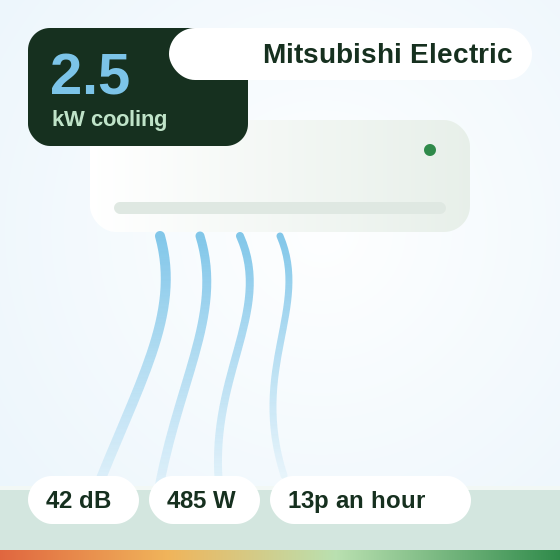
MSZ-LN25VG3 (indoor) with MUZ-LN25VG3 (outdoor), 2.5 kW
2.5 kW cooling · 42 dB · 485 W · 13p an hour
No current UK price found
Figures from the maker or retailer listing. Cost an hour is our own, at the price cap of 26.32p a kWh.